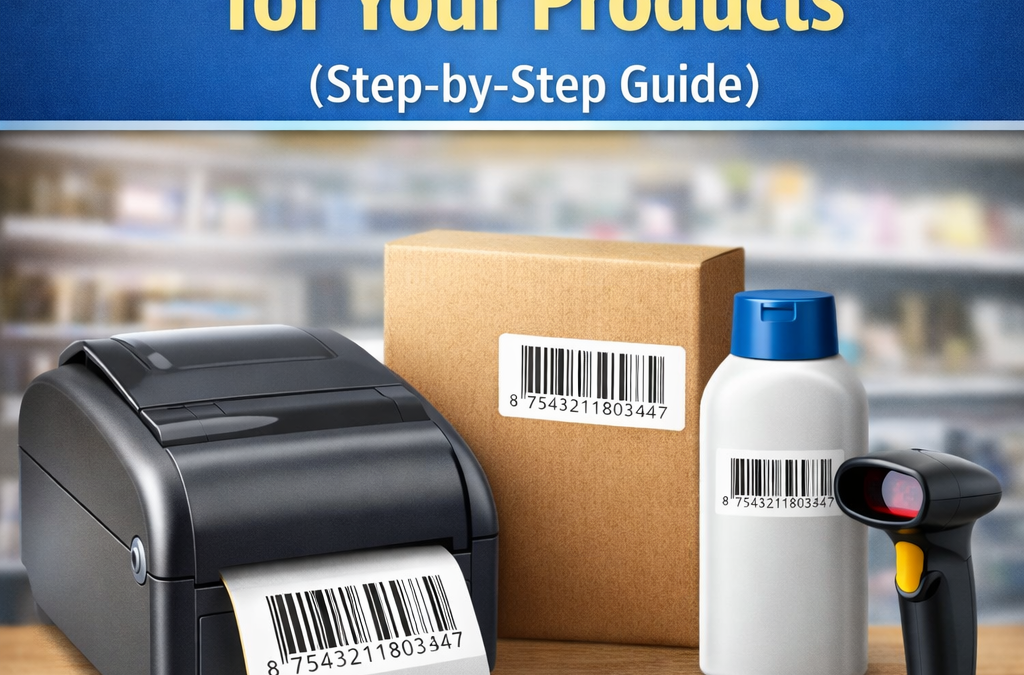
If you sell physical products, printing barcode labels is an important step in preparing your items for retail stores, inventory systems, and product packaging. Barcodes help businesses identify products quickly, track stock accurately, and simplify checkout processes in retail environments.
For many small businesses and product manufacturers, printing barcode labels may seem complicated at first. In reality, the process is simple once you understand the basic steps.
In this guide, we’ll explain how to print barcode labels for your products, what tools you need, and how businesses can create professional barcode labels for product packaging.
What Is a Barcode Label?
A barcode label is a printed label that contains a barcode image representing a unique product number. When scanned using a barcode scanner, the barcode is converted into the numeric code that identifies the product.
Barcode labels are commonly used on:
- Product packaging
- Bottles and containers
- Boxes and cartons
- Retail labels
- Warehouse inventory labels
The most widely used barcode format for retail products is the EAN-13 barcode, which contains a 13-digit number.
Why Businesses Use Barcode Labels
Barcode labels are widely used because they make product identification fast and reliable.
Faster Checkout
Retail stores use barcode scanners to quickly identify products during checkout instead of manually entering product information.
Accurate Inventory Tracking
Businesses can scan barcode labels to track stock levels, product movement, and inventory updates.
Reduced Human Errors
Manual data entry can lead to mistakes. Barcode scanning improves accuracy and efficiency.
Organized Product Management
Barcode labels help businesses manage large product catalogs more efficiently.
What You Need to Print Barcode Labels
Before printing barcode labels, you need a few basic things.
1. A Barcode Number
Each product must have a unique barcode number. Different products or variations require separate barcode numbers.
For example:
| Product | Barcode Needed |
|---|---|
| Face Cream 50g | Yes |
| Face Cream 100g | Yes |
| Lipstick Red | Yes |
| Lipstick Pink | Yes |
Each unique product variation should have its own barcode.
2. Barcode Image File
The barcode number must be converted into a barcode image that can be printed on labels.
Common barcode image formats include:
- PNG
- SVG
- EPS
These files can be placed directly on product packaging or label templates.
3. Label Printer or Standard Printer
Barcode labels can be printed using:
- Dedicated barcode label printers
- Thermal label printers
- Standard inkjet or laser printers
Small businesses often start by printing labels using standard printers and adhesive label sheets.
4. Label Material
Barcode labels are usually printed on:
- Adhesive sticker labels
- Product packaging labels
- Paper labels
- Thermal label rolls
The label should be durable and easy to scan.
Step-by-Step: How to Print Barcode Labels
Printing barcode labels is straightforward if you follow the correct process.
Step 1: Get Your Barcode Numbers
First, obtain a unique barcode number for each product.
Step 2: Generate the Barcode Image
Convert the barcode number into a barcode image file. The barcode image will display the barcode pattern and the numeric code underneath.
Step 3: Create a Label Layout
Use label design software or a simple template to place the barcode image on a label.
A typical barcode label includes:
- The barcode image
- The numeric barcode number
- Optional product name
Step 4: Print the Labels
Print the labels using a printer compatible with your label material.
Make sure the barcode is printed clearly with good contrast so barcode scanners can read it easily.
Step 5: Attach the Label to the Product
Place the barcode label on the product packaging in a location where it can be easily scanned.
Common placement areas include:
- Back of the product packaging
- Bottom of bottles or containers
- Side of product boxes
Avoid placing barcodes on curved or folded surfaces where scanning may become difficult.
Tips for Printing High-Quality Barcode Labels
To ensure your barcodes scan correctly, follow these best practices.
Maintain Good Print Quality
Blurry or distorted barcodes may not scan properly.
Use Proper Label Size
Barcode labels should be large enough for scanners to read easily.
Avoid Wrinkles or Distortion
Make sure the label is flat and not damaged when applied to packaging.
Keep Good Contrast
Black bars on a white background typically provide the best scanning results.
How NovoBarcode Helps Businesses Create Barcode Labels
For businesses that need barcode numbers and barcode images for product labeling, NovoBarcode provides a convenient solution.
NovoBarcode offers:
- EAN-13 barcode numbers
- Print-ready barcode image files
- Barcode packages for multiple products
- Quick digital delivery of barcode files
Once you receive the barcode image files, you can easily place them into label templates and print barcode labels for your products.
This makes it simple for small businesses, startups, and manufacturers to start using barcode systems without complicated setup.
Conclusion-
Barcode labels are an essential part of modern product packaging and inventory management. They allow businesses to identify products quickly, manage stock efficiently, and streamline retail operations.
Printing barcode labels is a straightforward process that involves obtaining barcode numbers, generating barcode images, and printing them on product labels.
For businesses planning to scale their product lines, implementing barcode labels early helps create a more organized and efficient product management system.
With the right tools and barcode numbers, businesses can start using barcode labels to improve retail operations and inventory tracking.
Frequently Asked Questions
What printer is used for barcode labels?
Barcode labels can be printed using thermal label printers, barcode printers, or standard inkjet and laser printers with adhesive label sheets.
What size should a barcode label be?
The barcode should be large enough for scanners to read easily. Most retail EAN-13 barcode labels are between 3–4 cm wide.
Can I print barcodes on a normal printer?
Yes. Many small businesses print barcode labels using standard inkjet or laser printers with sticker label sheets.
Where should a barcode label be placed?
Barcode labels are usually placed on the back or bottom of product packaging where they can be easily scanned.