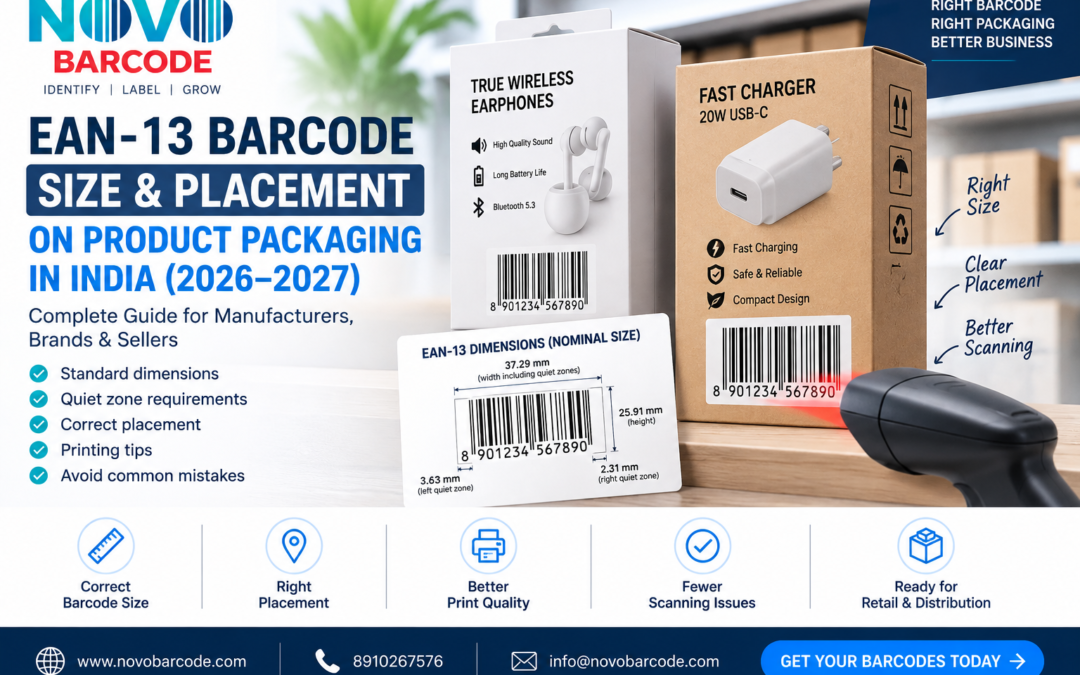
If you are putting an EAN-13 barcode on product packaging, one of the most important questions is not simply whether you have a barcode — it is whether the barcode is printed at an appropriate size and placed correctly.
A barcode can contain the correct number and still create scanning problems if it is made too small, its height is reduced too much, the quiet zones are removed, the print contrast is poor, or the barcode is placed over a curved, folded or damaged part of the package.
This guide explains EAN-13 barcode size, dimensions, quiet zones, placement and printing considerations for product packaging in India.
What Is the Standard Size of an EAN-13 Barcode?
EAN-13 symbols are designed to be printed within defined size ranges rather than being resized arbitrarily.
GS1 India’s barcode implementation guidance lists the following EAN-13 dimensions for a primary product unit:
| EAN-13 Size | Magnification | Width Including Quiet Zones | Height |
|---|---|---|---|
| Minimum | 0.80 | 29.83 mm | 20.73 mm |
| Ideal / Nominal | 1.00 | 37.29 mm | 25.91 mm |
| Maximum | 2.00 | 74.58 mm | 51.82 mm |
GS1 India’s guide also specifies an X-dimension range of approximately 0.264 mm to 0.66 mm for the thinnest bar, depending on the selected magnification. :contentReference[oaicite:3]{index=3}
For many normal retail packaging applications, the nominal size is a useful reference point. However, the final size should take the available packaging space and intended scanning environment into account.
EAN-13 Barcode Size in Millimetres
If you are designing packaging and your designer asks for the barcode dimensions, the nominal EAN-13 dimensions are approximately:
- Width including quiet zones: 37.29 mm
- Height: 25.91–25.93 mm
- Left quiet zone: approximately 3.63 mm
- Right quiet zone: approximately 2.31 mm
These measurements are associated with the nominal EAN-13 symbol specification. GS1’s specifications illustrate the nominal EAN-13 symbol using an X-dimension of 0.330 mm. :contentReference[oaicite:4]{index=4}
Important: Do not treat the barcode dimensions as a graphic that can simply be stretched or compressed to fit any available space. Scaling should preserve the barcode’s proportions and required scanning characteristics.
What Is the Quiet Zone of a Barcode?
The quiet zone is the clear area around the barcode that should remain free from other graphics, text, borders and printing.
It may look like unnecessary empty space, but scanners use this area to help identify where the barcode begins and ends.
For an EAN-13 barcode at the nominal X-dimension, GS1 specifications indicate a left quiet zone of approximately 3.63 mm and a right quiet zone of approximately 2.31 mm. :contentReference[oaicite:5]{index=5}
Do not place a product logo, decorative line, text, border or other graphic directly inside these areas.
Why Is Barcode Quiet Zone Important?
A barcode may look perfectly normal to the human eye while still being difficult for a scanner to identify.
Common quiet-zone problems include:
- Packaging text placed too close to the barcode
- Decorative borders touching the barcode
- Graphics printed beside the bars
- Barcode placed against a busy background
- Barcode sticker cut too close to the symbol
- Packaging artwork reducing the available margin
GS1 guidance identifies quiet zones as an important factor in reliable scanning. :contentReference[oaicite:6]{index=6}
Can I Make an EAN-13 Barcode Smaller?
Yes, EAN-13 symbols can be produced at different magnifications within the applicable specifications, but making a barcode as small as possible simply to save packaging space is not a good approach.
GS1 India’s implementation guide lists 0.80 magnification as the minimum example and 2.00 magnification as the maximum example for EAN-13, with the nominal size at 1.00. :contentReference[oaicite:7]{index=7}
The correct size depends on the application, printing process, packaging material and available space.
If your packaging has enough room, there is generally little reason to make the barcode unnecessarily small.
Should You Reduce the Height of an EAN-13 Barcode?
This is one of the most common packaging mistakes.
A designer may try to make a barcode fit a narrow space by reducing its height while keeping the width. This creates a visually shorter barcode, but it can negatively affect scanning performance.
GS1 India specifically warns that reducing the barcode height below the specified minimum is not recommended because it can cause scanning problems. :contentReference[oaicite:8]{index=8}
GS1’s barcode quality guidance similarly notes that reducing barcode height impairs reading efficiency. :contentReference[oaicite:9]{index=9}
Do not simply squash the barcode vertically to make it fit your packaging.
Where Should an EAN-13 Barcode Be Placed on Product Packaging?
The barcode should be positioned on a relatively flat, accessible part of the packaging where it can be scanned without unnecessary difficulty.
Common locations include:
- Back of a product box
- Side panel of a box
- Bottom of suitable packaging
- Product label
- Printed packaging panel
- Hang tag or barcode sticker
The exact position depends on the packaging design, product shape and scanning environment.
GS1 guidance recommends considering the orientation and location of the barcode in relation to the product packaging and handling process. :contentReference[oaicite:10]{index=10}
Where Should You NOT Place a Barcode?
Try to avoid locations where the barcode can become distorted, damaged or difficult for a scanner to access.
Examples include:
- Sharp packaging corners
- Deep folds
- Seams
- Curved areas that distort the symbol
- Areas likely to be scratched
- Areas covered by transparent reflections
- Areas with heavy decorative graphics
- Areas where packaging text overlaps the quiet zone
GS1’s barcode quality guidance specifically identifies packaging folds, deteriorated codes and inappropriate positioning on cylindrical packaging as potential causes of scanning problems. :contentReference[oaicite:11]{index=11}
Barcode Placement on Bottles and Cylindrical Packaging
Bottles, tubes and other cylindrical products require extra care because the curvature can affect how a scanner sees the barcode.
Whenever possible, position the barcode so that the scanning area remains accessible and the symbol is not wrapped around the package in a way that causes excessive distortion.
If the packaging design makes a flat barcode area impossible, discuss the placement with your packaging designer and printer before mass production.
What Colour Should an EAN-13 Barcode Be?
The safest and most widely recommended combination is:
Black bars + white background.
This provides strong contrast and is easy for scanners to interpret.
GS1 guidance explains that dark bars on a light background are preferred for efficient scanning and identifies black bars on white as the optimum/common combination. :contentReference[oaicite:12]{index=12}
Although other colour combinations can sometimes work, attractive packaging design should never take priority over reliable barcode scanning.
Can I Put a Barcode on a Coloured Background?
It depends on the colour and contrast.
A barcode printed over a dark or visually complex background can create scanning problems.
For packaging where reliability is important, a simple white or very light barcode background with dark bars is the safer choice.
Also remember that the quiet zones should remain clear and sufficiently light.
Can I Put a Barcode on a Shiny Package?
Glossy and reflective packaging can create additional scanning challenges because reflections may interfere with the scanner.
GS1 India identifies shiny barcode backgrounds as a factor that can affect scannability, and its verification guidance recommends considering the spectral characteristics of the printed symbol and background. :contentReference[oaicite:13]{index=13}
If you are using glossy packaging, test a physical printed sample before approving a large production run.
Barcode Size for Different Product Packaging
The available packaging space varies significantly between products.
| Product Type | Common Barcode Placement Consideration |
|---|---|
| Product box | Back or side panel with sufficient flat space |
| Cosmetic bottle | Flat label area where possible |
| Food pouch | Flat rear or front packaging panel |
| Clothing tag | Hang tag or suitable label |
| Electronics box | Rear or side panel |
| Small accessories | Suitable label or retail packaging |
The product category does not automatically determine one universal barcode size. Packaging dimensions, printing method and scanning environment must also be considered.
PNG or SVG: Which Barcode File Is Better for Packaging?
The file format matters when a barcode is being supplied to a packaging designer or printer.
PNG
PNG can be useful for digital artwork and many standard printing workflows when supplied at an appropriate resolution.
SVG
SVG is a vector format and can be particularly useful for professional packaging artwork because it can be scaled without the same type of pixelation associated with raster images.
If your packaging designer works with professional design software, providing a vector barcode file can make integration into the artwork easier.
NovoBarcode’s custom barcode product provides 300 DPI PNG and SVG files for customers who need barcode artwork for their products.
View Custom Barcode Quantity Options →
Why Does My Barcode Scan on My Phone but Not at a Scanner?
Testing a barcode with a smartphone can be useful, but a successful phone scan does not necessarily prove that the barcode will perform correctly in every scanning environment.
Possible problems include:
- Barcode too small
- Insufficient quiet zone
- Low print contrast
- Barcode height reduced too much
- Printing defects
- Curved packaging
- Glossy or reflective surface
- Damaged label
- Distorted artwork
- Incorrect barcode data
GS1 recommends checking factors including size, quiet zones, contrast, barcode height, packaging and symbol positioning when troubleshooting barcode quality. :contentReference[oaicite:14]{index=14}
Should You Test a Barcode Before Printing Thousands of Packages?
Yes.
If you are preparing a new product package, do not immediately approve a large printing run simply because the barcode looks correct on a computer screen.
A better workflow is:
- Prepare the correct barcode artwork.
- Add it to the packaging design.
- Print a physical sample.
- Check the barcode size and quiet zones.
- Inspect the print quality.
- Test scanning.
- Make corrections if necessary.
- Approve the final packaging artwork.
- Proceed with bulk printing.
This can help reduce the risk of discovering a barcode problem after thousands of packages have already been printed.
How to Avoid Barcode Scanning Problems
Use this quick checklist before approving your packaging:
- ✓ Use the correct barcode number.
- ✓ Maintain the barcode’s proportions.
- ✓ Do not reduce the height excessively.
- ✓ Maintain sufficient quiet zones.
- ✓ Use strong contrast.
- ✓ Keep the barcode away from folds and seams.
- ✓ Avoid placing it across strongly curved surfaces.
- ✓ Keep the barcode free from unnecessary graphics.
- ✓ Avoid damaged or blurred printing.
- ✓ Test a physical package before mass printing.
EAN-13 Barcode Size: Quick Reference
| Factor | What to Remember |
|---|---|
| Nominal magnification | 1.00 |
| Nominal width including quiet zones | 37.29 mm |
| Nominal height | Approximately 25.9 mm |
| Left quiet zone at nominal size | Approximately 3.63 mm |
| Right quiet zone at nominal size | Approximately 2.31 mm |
| Preferred contrast | Dark bars on a light background |
| Height reduction | Avoid excessive reduction |
These figures are based on GS1’s published specifications and GS1 India’s implementation guidance. Actual packaging requirements should be evaluated according to the intended application. :contentReference[oaicite:15]{index=15}
Need a Barcode for Your Product Packaging?
If you already have your product packaging design ready, the next step is to obtain the appropriate barcode information and prepare the barcode artwork for your designer or printer.
NovoBarcode provides EAN-13 barcode services and print-ready barcode files for businesses that need product barcode artwork.
Buy Barcode from NovoBarcode →
For businesses requiring a specific number of barcodes, you can also explore the Custom Barcode Quantity option.
Frequently Asked Questions
What is the ideal size of an EAN-13 barcode?
The nominal EAN-13 size is approximately 37.29 mm wide including quiet zones and 25.9 mm high. GS1 India also provides minimum and maximum magnification ranges depending on the application. :contentReference[oaicite:16]{index=16}
Can an EAN-13 barcode be smaller than 37.29 mm?
Yes. EAN-13 can be produced at smaller magnifications within the applicable specifications. GS1 India’s implementation guide lists 0.80 magnification as a minimum example for a primary retail unit. :contentReference[oaicite:17]{index=17}
What is the quiet zone of an EAN-13 barcode?
The quiet zone is the clear area surrounding the barcode. At nominal size, the EAN-13 quiet zones are approximately 3.63 mm on the left and 2.31 mm on the right. :contentReference[oaicite:18]{index=18}
Can I reduce the height of an EAN-13 barcode?
Excessively reducing barcode height is not recommended because it can negatively affect scanning performance. :contentReference[oaicite:19]{index=19}
What is the best colour for an EAN-13 barcode?
Black bars on a white or light background provide strong contrast and are the safest general choice for reliable scanning. :contentReference[oaicite:20]{index=20}
Can I put an EAN-13 barcode on a curved bottle?
It can be done, but the packaging shape and barcode orientation must be considered carefully. Avoid positioning that excessively distorts the symbol or makes scanning difficult.
Should I test my barcode before mass printing?
Yes. Testing a physical printed sample before approving a large packaging run can help identify size, contrast, placement and printing problems early.
Final Thoughts
The barcode is a small part of your packaging, but its size, placement and print quality can have a major effect on whether it scans reliably.
For EAN-13 product packaging, pay particular attention to barcode dimensions, quiet zones, height, contrast, printing quality and placement.
Do not make the barcode smaller simply because your packaging design has limited space. Instead, plan the barcode area early in the packaging design process and test a physical sample before bulk production.
Need an EAN-13 barcode for your product?
Continue Reading: EAN-13 Guides
Explore practical guides for product identification, packaging and retail preparation.
 Barcode for Clothing Products in India: EAN-13 Guide
Read guide →
Barcode for Clothing Products in India: EAN-13 Guide
Read guide →
 Why Retailers Reject Products With Barcode Problems | India Guide
Read guide →
Why Retailers Reject Products With Barcode Problems | India Guide
Read guide →
 Barcode for Multipack Products in India: Do You Need a New One?
Read guide →
Barcode for Multipack Products in India: Do You Need a New One?
Read guide →
 Why Is My Barcode Not Scanning? 11 Common EAN-13 Problems & Solutions
Read guide →
Why Is My Barcode Not Scanning? 11 Common EAN-13 Problems & Solutions
Read guide →